TABLE OF CONTENTS
Video Guides
Watch these helpful video tutorials to get started with Scooby mod menu:
Complete Setup Guide
Full walkthrough on how to install and use Scooby mod menu
Money Making Guide
Learn the best money methods with Scooby mod menu
CS2 Setup Guide
How to install and use Scooby for Counter-Strike 2
CS2 Showcase
See Scooby CS2 features in action
RDR2 Showcase
See Scooby RDR2 mod menu features in action
Introduction
Welcome to the Scooby Mod Menu Guide! This guide covers everything you need to know:
- Modded Outfits
- Modded Vehicles
- Playing in public lobbies
- Troubleshooting common issues
Please make sure to follow this guide step by step. We are not responsible for any bans, so please use at your own caution.
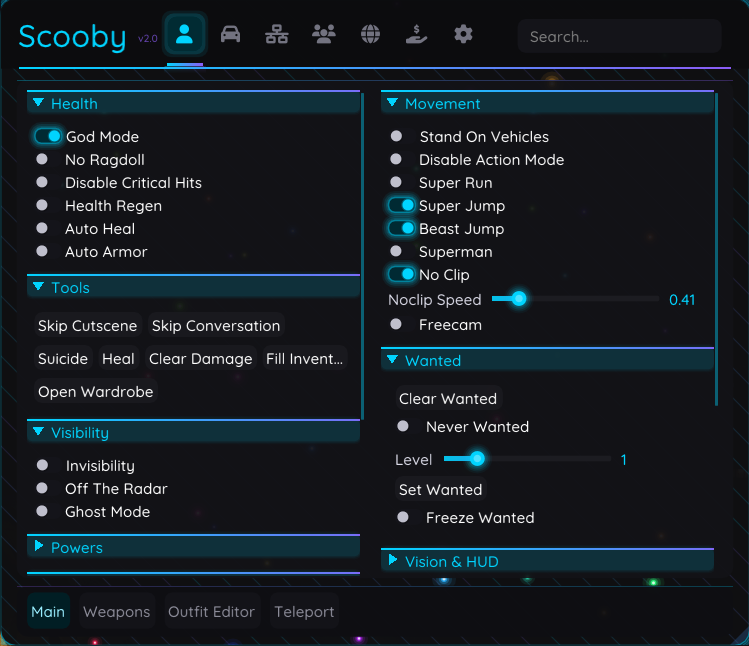
First Time Setup
When installing Scooby for the first time, follow these steps:
Step 1: Download
Head over to scoobymenu.xyz and find the download button. Download the menu using the Mega file. Make sure your anti-virus is turned off.
Step 2: Extract & Run
Extract the files into any folder. After that, run the .exe as an administrator. This ensures the launcher will run successfully.
Step 3: Install Requirements
Required Software:
VC Runtimes:
https://www.techpowerup.com/download/visual-c-redistributable-runtime-package-all-in-one/DirectX:
https://www.microsoft.com/en-gb/download/details.aspx?id=6812Make sure you have your graphics drivers up to date.
Step 4: Inject
Load up GTA and wait for it to be on the main menu or in story mode. Then go back to the launcher, get a free license, and follow the steps.
When you have acquired your free license, click Inject. This should inject the menu into the game. Then press Insert to open the menu - congratulations, you're done!
Modding Outfits
Modding outfits with Scooby is very simple! The menu includes a saved outfits section.
Using Shared Outfits
To use other people's saved outfits, find the file they share (many outfits can be found in the Scooby Discord) and save it to:
C:\scooby\GTA5\outfits
When you load in-game, use the menu to navigate to the outfits section and you will find the modded outfits there!
Creating Your Own Outfits
You can also mod outfits yourself! Head to the Outfit Editor in the Scooby menu. You can change the numbers on your character's clothing, and when you've found your perfect outfit, save it!
Modding Vehicles
Modding vehicles with Scooby is also very simple!
Creating Modded Vehicles
Open the menu and head to the Vehicles icon, then click Vehicle Editor at the bottom. This will allow you to mod your vehicle. To save it, head to Saved Vehicles, click Save Vehicle, name it, and save!
Using Shared Vehicles
Similar to outfits, you can use others' saved vehicles. Head to the Discord, find the vehicles thread, and download a file you want. Then drop it into:
C:\scooby\GTA5\vehicles
Money Making Methods
Within the Scooby menu there are many ways to make money if you don't want to do it legitimately.
Heist Method
Make sure to enable Solo Hosting in the Recovery tab. This lets you do heists that require more than 1 person. Head to the Heists tab, set up your heist accordingly, and start it. When the heist starts, click Insta Finish to end it immediately - you'll receive 100% of the cut!
Casino Method
Head to the casino and enable Manipulate Slot Machines in the Recovery > Casino option. Go to the slots, bet the max, and you'll hit the jackpot! Disable the option, force yourself to fail a slot, then turn it back on and repeat.
Business Method
Head to the Business tab on the menu and find the Fill Supplies button. Your supplies will be maxed out, ready for you to sell!
Using Scooby in Public Lobbies and with Friends!
Scooby V3 has introduced a new update, this involves the ability to play in public lobbies and play with friends.
How to Set Up
To do this you must join a public lobby and wait for everyone to get kicked out so you are the host of the lobby (YOU MUST BE THE HOST). After, you must turn on the Player Magnet found in the Network tab. This will make players join your lobby.
Playing with Friends
If you want to play with your friend, do the same steps and ensure you are the host. Then simply just invite them to the lobby.
What Works in Public Lobbies
The following features are fully functional in public lobbies:
- Recovery Features - Money methods, heist editor, casino manipulation
- Vehicle Features - Spawn vehicles, vehicle editor, saved vehicles
- Outfit Features - Outfit editor, saved outfits, modded clothing
- Player Features - Godmode, teleportation, super jump, etc.
- World Features - Weather control, time control, clear wanted level
- Weapon Features - All weapons, infinite ammo, no reload
- Business Features - Fill supplies, instant production
- Heist Features - Solo hosting, insta-finish, custom cuts
Important Notes
- Always ensure you are the host of the lobby for best results
- Use the Player Magnet feature to populate your lobby
- Some features may require you to be in a solo public lobby first
- Be cautious when using features around other players
Troubleshooting
Here are solutions to common issues you may encounter:
Failed to allocate memory in target process
Head to your Rockstar Launcher, click on Settings, and disable BattlEye. This will fix the issue.
Please return to Grand Theft Auto V (Black Screen)
You must inject the menu during the loading screen. This message means the game is signifying you're going back to story mode.
BattlEye is required to play GTA V Online
Same solution - inject the menu during the loading screen, not when you're already in the game.
Black screen with an error message
Restart your game without opening Scooby, go to story mode, and turn off Frame Generator in the GTA graphics settings.
Failed to write process memory
Turn off BattlEye in the Rockstar Launcher settings.
Launcher closes after opening
Use a VPN - your ISP may be blocking the menu. If that doesn't work, delete the C:\scooby folder to clear your cache, then restart Scooby.
Free key website unreachable
Your internet is blocking it - use a VPN.
Injection success but doesn't work in game
Use a VPN - your ISP may be interfering with the connection.
Injection Failed
There are several fixes:
- Use a VPN
- Ensure all anti-virus software is disabled
- Reset the Scooby cache by deleting the
C:\scoobyfolder and restarting